The BFCM Checklist for Shopify 2026: A Complete Preparation Guide for Store Owners
Contents
Black Friday and Cyber Monday have stopped behaving like a weekend. For most Shopify merchants they now function as a compressed quarter, where a handful of days decide how the full year reads. In 2025, Shopify merchants moved 14.6 billion dollars over the four-day window, a 27 percent jump on the year before, with a peak of 5.1 million dollars in sales every minute at noon Eastern on Black Friday. Those figures are already history. The stores planning for the next cycle are not asking whether the season will be bigger. They are asking whether their store, their inventory, their ads, and their search presence will be ready when the traffic arrives.
This BFCM checklist for Shopify 2026 is built to answer that question across every discipline that touches the sale, not just the marketing calendar. It covers store performance and development, search and AI discoverability, conversion and average order value, pricing, email and SMS, paid media, weekend operations, and the post-sale work that turns a spike into a lasting customer base. It is a preparation guide first and a reference you can return to through the season, written for store owners and for the teams they lean on for dev, SEO, and ads.
A note on how to read it: treat the timeline as the spine and the workstreams as the muscle. You do not need to complete every item, but you do need to respect the lead times, because the most valuable BFCM work cannot be rushed in the final week.
The BFCM 2026 Dates and Why the Calendar Matters
BFCM 2026 falls late in November. Black Friday is Friday, November 27, 2026, and Cyber Monday is Monday, November 30, 2026. The wider Cyber Week runs from November 27 through December 3, which is where a growing share of orders now lands as shoppers spread purchases across the full week rather than a single day.
The reason the calendar matters is lead time. Several of the tasks that most influence BFCM revenue have a fixed runway that no amount of effort can compress:
- Best-selling inventory often needs ordering eight or more weeks ahead, because overseas suppliers still run long production and shipping cycles.
- SEO content and landing pages typically need three to six months to earn rankings, so a Black Friday guide published in October will not rank in November. August is the practical latest start for content you expect to rank during peak search.
- Email sender reputation warms over weeks, not days, so a list you plan to email heavily in late November should be active well before then.
- Ad accounts accumulate learning over time, and creative needs real testing windows in October before budgets scale.
A useful way to frame the runway is a countdown from the sale. The table below maps the phases most established teams work to.
Stores that begin around the end of August tend to enter the weekend with tested systems. Stores that start in late October can still execute, but at compressed quality. Stores that start in November are usually reacting rather than planning.
What Changed for BFCM 2026
Before the checklist, it helps to name what is different this cycle, because a few shifts change where preparation effort actually pays off.
Discovery is moving into AI surfaces
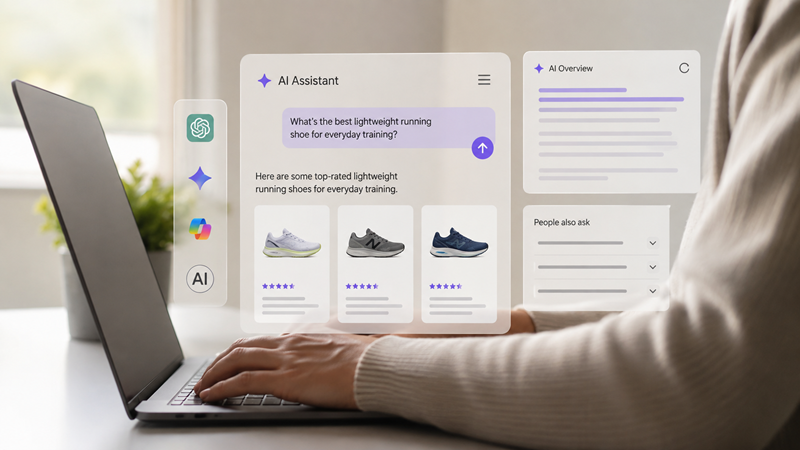
This is the largest change and the one most checklists still skip. AI-referred traffic to United States retail sites on Black Friday 2025 grew more than 800 percent year over year, according to Adobe Analytics’ holiday season report, and shoppers arriving through AI referrals converted at meaningfully higher rates than other traffic. Google AI Overviews now appear on a meaningful share of shopping queries, and assistants such as ChatGPT, Gemini, and Perplexity have become genuine product discovery channels rather than novelties. Shoppers increasingly ask an assistant to compare options and hand back a shortlist, which means the question is no longer only whether you rank on a results page, but whether an AI system can read your catalog and recommend you.
Mobile is the default, not a segment
Close to seven in ten BFCM orders now come from phones, and mobile carries the majority of Cyber Monday sales. A slow or awkward mobile path is the fastest way to lose a sale you already paid to acquire.
Discipline beats depth on discounts
In 2025, no major deal day averaged more than a 30 percent discount. The stores that protected margin used structured, tiered offers rather than a single blanket cut. Deep discounts attract one-time bargain hunters and erode brand value, while measured offers convert without giving away the year’s profit.
The surge extends past the sale
Support volume during BFCM week commonly rises 80 percent or more, and return requests spike 25 to 45 percent in the weeks that follow. Planning that ignores the aftermath leaves both revenue and goodwill on the table.
With that context set, here is the checklist itself.
1. Foundation and Planning
Everything downstream depends on decisions made here, and this is the phase most often skipped. Everything in this BFCM checklist for Shopify flows from the numbers and the offer you set now.
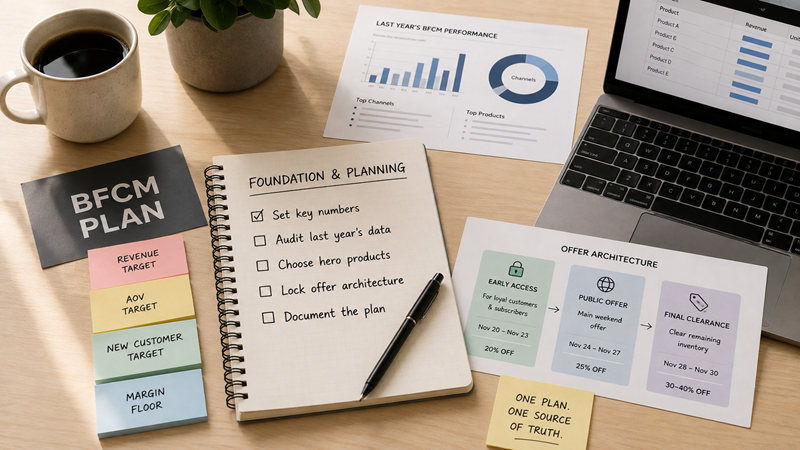
- Set four numbers before anything else: a revenue target, an average order value target, a new-customer target, and a margin floor you will not cross. Use last year’s BFCM as the baseline and plan for growth in line with your recent trajectory.
- Audit last year’s data. Pull best sellers, top channels, the discount depth that actually converted, where checkout leaked, and what stocked out. Write it down, because this becomes your playbook skeleton.
- Choose your hero products and protect high-margin items from deep cuts. Decide which lines carry the promotion and which stay near full price.
- Lock your offer architecture early. A tiered structure tends to outperform a flat sitewide cut: early access for your most loyal customers and subscribers at a premium moment, a public offer across the main weekend, and a final clearance step for remaining inventory. Assign dates and depths to each tier.
- Document the plan in one shared place so marketing, support, and development all work from the same version.
For the strategic layer that sits above this checklist, the deeper tactics on urgency, FOMO, and pricing are worth reading in the companion guide to BFCM strategies for Shopify stores.
2. Inventory and Merchandising
Nothing undermines a strong campaign faster than selling stock you cannot ship, so inventory planning belongs early in the timeline.
- Forecast demand at the SKU level, not the storewide level. A simple ABC split helps: your A products drive most of the revenue and deserve safety stock, while C products may be dead stock you can clear during the sale.
- Order hero-product inventory now if you rely on suppliers, and add a buffer for anything with viral potential.
- Confirm inventory syncs across Shopify, your warehouse or third-party logistics provider, and any marketplace channels, with a single source of truth to prevent overselling.
- Plan bundles and kits while there is still time to test them. Bundles lift average order value and can move slower stock alongside best sellers.
- Prepare merchandising for the season: dedicated collection pages for the sale, clear hero-product placement, and a plan for sold-out states so pages keep working when stock runs low.
3. Store Performance and Technical Readiness
This is the development pillar, and it is where a fast, stable store quietly wins. Shopify’s platform auto-scales, but your theme, apps, and custom code are where most stores slow down under load.
- Run baseline speed tests on your five highest-traffic pages: home, top product, main collection, cart, and checkout. Capture Core Web Vitals from real-user field data in Google Search Console, not only a lab score.
- Aim for the current thresholds at the 75th percentile of real mobile visits: Largest Contentful Paint under 2.5 seconds, Interaction to Next Paint under 200 milliseconds, and Cumulative Layout Shift under 0.1. Interaction to Next Paint is where app-heavy stores most often fail, because third-party scripts run on every tap.
- Audit your installed apps. App JavaScript is the single strongest predictor of a slow store, and the more scripts you stack, the slower your pages get. Remove anything that does not contribute to revenue, and check for leftover code from apps you have already uninstalled.
- Compress and correctly size images, especially hero and product media, and set explicit dimensions so the layout does not shift as the page loads.
- Test the full journey on real devices, not just the homepage: variant selection, cart drawer, and the complete checkout on both iOS Safari and Android Chrome, which handle forms and payment buttons differently.
- Update your theme now if it is outdated, and make all structural changes on a development copy first.
- Freeze the store roughly two weeks out. Stop deploying theme changes about 14 days before Black Friday, because every change is a regression risk. During the sale week, the only changes should be price and discount toggles.
- Run a load test or dress rehearsal. Larger teams simulate peak conditions on critical paths such as checkout and order creation well before the window.
Deep performance work and checkout extensibility often need a developer who knows Shopify’s architecture. Structural theme rebuilds, render-blocking fixes, and custom checkout components are the kind of work merchants hire a Shopify expert for when an app cannot solve it.
For high-volume and enterprise stores, the extra headroom of checkout extensibility, Shopify Functions, and scripted logic is worth planning early, and teams building on Shopify Plus can extend the checkout and automate discounts in ways the standard plan does not allow.
4. Search and AI Discoverability
Most BFCM checklists treat SEO as a footnote. In 2026 it is a distinct workstream, because a large and growing share of discovery now happens through search engines and AI assistants that both need lead time and structured data to surface your store.
- Publish seasonal content and landing pages early. Because ranking takes months, gift guides, category pages, and any deals content you want visible in November should be live by August or September so search engines can crawl, index, and build authority.
- Fix technical SEO fundamentals: canonical tags, a clean sitemap, logical internal linking, and crawlable collection pages. Cannibalization between similar pages dilutes rankings, so consolidate where two pages compete for the same term.
- Add and validate structured data on product pages. Product schema in JSON-LD that exposes price, availability, and reviews is what both Google and AI systems read, and pages with structured data are cited far more often in AI Overviews than pages without it.
- Treat your product feed as acquisition infrastructure. Complete, accurate attributes and product identifiers in Google Merchant Center feed both Shopping ads and the AI shopping surfaces, and feed quality is the common multiplier across them.
- Prepare for AI shopping channels. Shopify now syndicates catalogs to AI channels such as ChatGPT and Google’s AI surfaces, and agentic storefront capabilities are enabled by default for many stores. Make sure your catalog data is clean, your policies are clear and machine-readable, and your best products carry complete information, because an assistant can only recommend what it can reliably read.
- Keep the answers on the page. Clear shipping cutoffs, return terms, and sizing details help both shoppers and the assistants that now summarize your store, and they reduce pre-purchase support load at the same time.
Earning organic and AI visibility in a competitive season is ongoing work rather than a one-week push. Merchants who want that visibility built and maintained through the fourth quarter often bring in Shopify SEO experts to handle the technical, content, and structured-data work as one connected effort.
5. Conversion Rate Optimization and Average Order Value
Traffic is only half the equation. The stores that win the weekend are usually the ones that get the most from each visitor rather than the ones with the most visitors.
- Reduce checkout friction. Offer the payment methods shoppers actually use, including Shop Pay, Apple Pay, Google Pay, and PayPal, and remove unnecessary fields. A customer who has already entered payment details is the highest-intent moment in the entire funnel.
- Set a free-shipping threshold slightly above your current average order value to lift basket size without eroding margin.
- Use urgency and scarcity honestly. Countdown timers, genuine low-stock indicators, and clear sale end times move shoppers from hesitation to purchase, but only when the signals are true.
- Build upsell and cross-sell into the journey. Frequently-bought-together bundles, cart add-ons, and post-purchase offers raise average order value at the moments shoppers are most receptive. Test offers and thresholds on normal October traffic so they are dialed in before the volume hits.
- Add social proof where it reduces doubt. Reviews and ratings on product pages and near checkout reassure first-time buyers who found you during the rush.
On the average-order-value side, a personalized recommendation engine does a lot of quiet work, and apps such as Wiser surface frequently-bought-together bundles, cart-drawer suggestions, and post-purchase upsells that adapt to how each shopper behaves.
6. Pricing and Competitive Positioning

Pricing during BFCM is a margin decision as much as a marketing one, and shoppers now compare prices in real time before they commit.
- Set your discount depth with your margin floor in mind. The 20 to 30 percent band is the common sweet spot, since shallower offers can feel underwhelming in a season built on deals, and much deeper cuts can damage perceived value and attract only bargain hunters.
- Protect high-margin and hero products from the deepest cuts, and use bundles or a gift with purchase where a straight discount would cost too much.
- Watch competitor pricing during the window. Shoppers frequently leave a product page to check a rival, and many do not come back. Knowing where you sit relative to competitors lets you respond without racing to the bottom.
- Keep pricing changes controlled and reversible, with clear minimum and maximum boundaries so a fast decision during the weekend does not quietly break your margins.
Because price comparison shopping peaks during BFCM, some merchants show competitor prices directly on the product page and monitor market movements in the background, which is the problem a tool like Price Mirror is built to solve, keeping shoppers on the page while protecting margin.
7. Email, SMS, and Lifecycle Flows
Owned channels are the most profitable traffic you have during BFCM, and the automated flows do most of the selling once the volume arrives.
- Grow the list now. A genuinely good opt-in offer in August and September captures your cheapest BFCM buyers, and a welcome or spin-to-win incentive builds the audience you will monetize later.
- Build and test the core flows well before November: welcome, abandoned cart, abandoned checkout, browse abandonment, and post-purchase. Let them run through the autumn so your sender reputation warms and revenue compounds.
- Segment rather than blast. Early access for VIPs and subscribers, a different message for first-time buyers, and tailored reminders for cart abandoners all outperform a single message sent to everyone.
- Plan the send calendar across the full Cyber Week, not only the two headline days, and coordinate email with SMS so the cadence supports the shopper rather than overwhelming them.
- Warm up before the peak. Sending to engaged segments in the days before the sale protects deliverability when the heavy volume begins.
8. Paid Media and Advertising Readiness
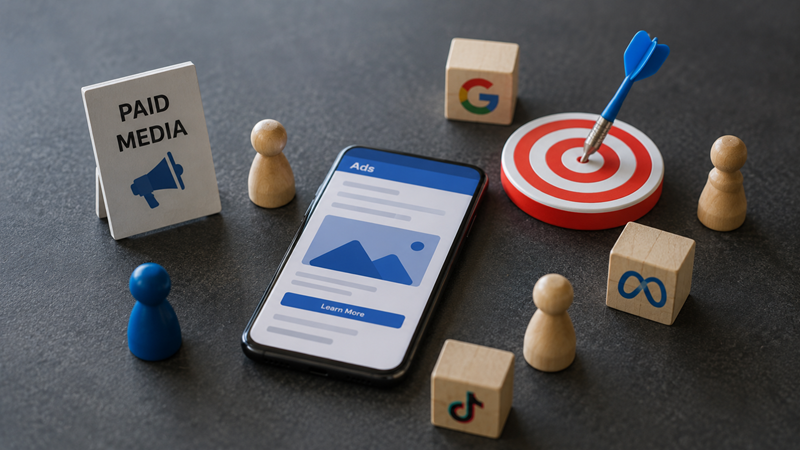
Ad costs rise during BFCM as everyone competes for the same attention, so structure and preparation decide whether paid media returns a profit.
- Prepare and test creative in October. Creative fatigue sets in quickly at peak spend, so build variety and identify winners before budgets scale.
- Structure campaigns and audiences ahead of time, and let accounts accumulate learning rather than launching cold on Black Friday morning.
- Make discounts visible in ads. Sale pricing that shows in Shopping listings and creative earns more attention than a generic message.
- Set budget pacing and guardrails so spend follows performance across the week rather than exhausting early.
- Align landing pages with ads. The page a shopper lands on should match the offer and load fast on mobile, or the click is wasted.
- Measure by channel so you know which sources deserve more budget and which to trim, both during and after the weekend.
Peak-season paid search and social reward experienced hands, since bid pressure and creative churn move fast, and merchants who want campaigns actively managed through the window often work with a team for Shopify PPC management rather than steering it alone.
9. The BFCM Weekend: Day-of Operations
By the time the sale opens, the structural work is done. The weekend is about watching, responding, and keeping systems steady.
- Run a simple war room. Put marketing, support, and development in one channel so issues are seen and fixed quickly.
- Monitor the essentials in real time: conversion rate, add-to-cart rate, checkout completion, best sellers, and low-stock alerts.
- Keep the store frozen. The only changes during the weekend should be price and discount toggles, so resist the urge to ship fixes that could regress under load.
- Staff support for the surge and lean on saved replies for common questions about shipping, returns, and discount codes. Consider automation for repetitive order-status questions so your team can handle the complex cases.
- Watch inventory closely and update or hide sold-out products so pages and feeds stop promoting what you cannot ship.
10. Post-BFCM: Returns, Retention, and the Q1 Handoff

The weekend ends, but the work that compounds happens next. Discount shoppers are less loyal by default, so the post-sale period is where you decide whether they become repeat customers.
- Prepare for returns before they arrive. Clear policies and templated responses keep the 25 to 45 percent return surge from overwhelming support, and a smooth returns experience protects goodwill.
- Move high-value buyers into loyalty and retention flows rather than treating them as one-time bargain hunters. A welcome-to-the-brand sequence for new BFCM customers can lift repeat purchase rate.
- Run a post-mortem while it is fresh: which products, channels, and creative won, where checkout leaked, and what to templatize for next year.
- Clean up seasonal SEO. In early January, redirect or update expired holiday landing pages, remove time-sensitive deal language, and mark sold-out bundles as unavailable in your feed, because search engines and AI assistants will keep serving stale pages and dead pricing otherwise, which costs credibility.
- Analyze profitability at the SKU level after fees, shipping, and returns, and use it to shape your first-quarter strategy.
Common BFCM Mistakes to Avoid
A short list of the errors that repeatedly cost Shopify stores during the season:
- Starting too late, so the work with the biggest payoff gets cut first.
- Discounting on instinct without a margin floor, then discovering the profit was given away.
- Optimizing the homepage while the mobile checkout stays slow.
- Ignoring AI and search discovery until November, long after the ranking window has closed.
- Treating the weekend as the finish line and neglecting returns and retention.
Frequently Asked Questions
When should I start preparing for BFCM 2026?
Late August is the practical starting point for most Shopify stores. That gives SEO content time to rank, inventory time to arrive, and email lists time to warm up before the traffic spike in late November.
What discount percentage should I use for BFCM 2026?
20 to 30 percent is the range most Shopify stores land on. Discounts under 15 percent tend to feel underwhelming during a season built around deals, while cuts over 40 percent can damage perceived brand value and mostly attract one-time bargain hunters rather than repeat customers.
Does AI search actually matter for BFCM traffic?
Yes, and the gap is widening. AI-referred traffic to U.S. retail sites on Black Friday 2025 grew more than 800 percent year over year, and that traffic converted at a noticeably higher rate than traffic from other sources. Product schema, clean feed data, and clear on-page policy language are what let AI systems recommend your store.
How long before Black Friday should I freeze my Shopify theme?
Roughly two weeks. Most established stores stop deploying structural theme or app changes about 14 days before Black Friday and limit any changes during sale week to price and discount toggles, since every other change is a regression risk under peak load.
What is the biggest mistake Shopify merchants make during BFCM?
Starting too late. Content, inventory, ad-account learning, and email sender reputation all have fixed runways that cannot be compressed into the final week, so a rushed store usually shows up as a slow checkout, a stockout, or an AI Overview it never appears in.
How to Use This Checklist
The pattern across every strong BFCM is the same: the weekend is won in the weeks before it. A Shopify BFCM checklist is only useful if it drives action against the lead times that matter, which is why this guide is organized around a countdown rather than a single burst of effort. Start with the foundation, respect the runways for inventory, content, and email, and treat store performance and discoverability as seriously as the discount itself.
Preparing across development, SEO, ads, conversion, and retention at once is a large undertaking, and few store owners can run all of it alone while also managing the day-to-day. Whether you handle it in-house or bring in specialist help for the parts that need it, the goal is the same: enter the last week of November 2026 with a fast, discoverable, well-stocked store and tested systems, so the traffic you worked all year to earn actually converts.

Amit Porwal
CEO and FounderAmit Porwal is the CEO and Founder of Expert Village Media and Wiser AI . He’s passionate about e-commerce, and loves helping Shopify store owners boost sales with upselling, cross-selling, digital marketing, & personalized shopping experiences. With years of experience in e-commerce web development Amit believes in building simple and effective online store that actually make a difference. He is always excited to talk about the power of personalization and how he can make e-commerce smarter and more customer-friendly with the help of AI.
 US Office
 INDIA Office
 UK Office